
Why a 5G OpenWrt Router Can Be a Smart Upgrade for Gaming, Streaming and Mobile Work
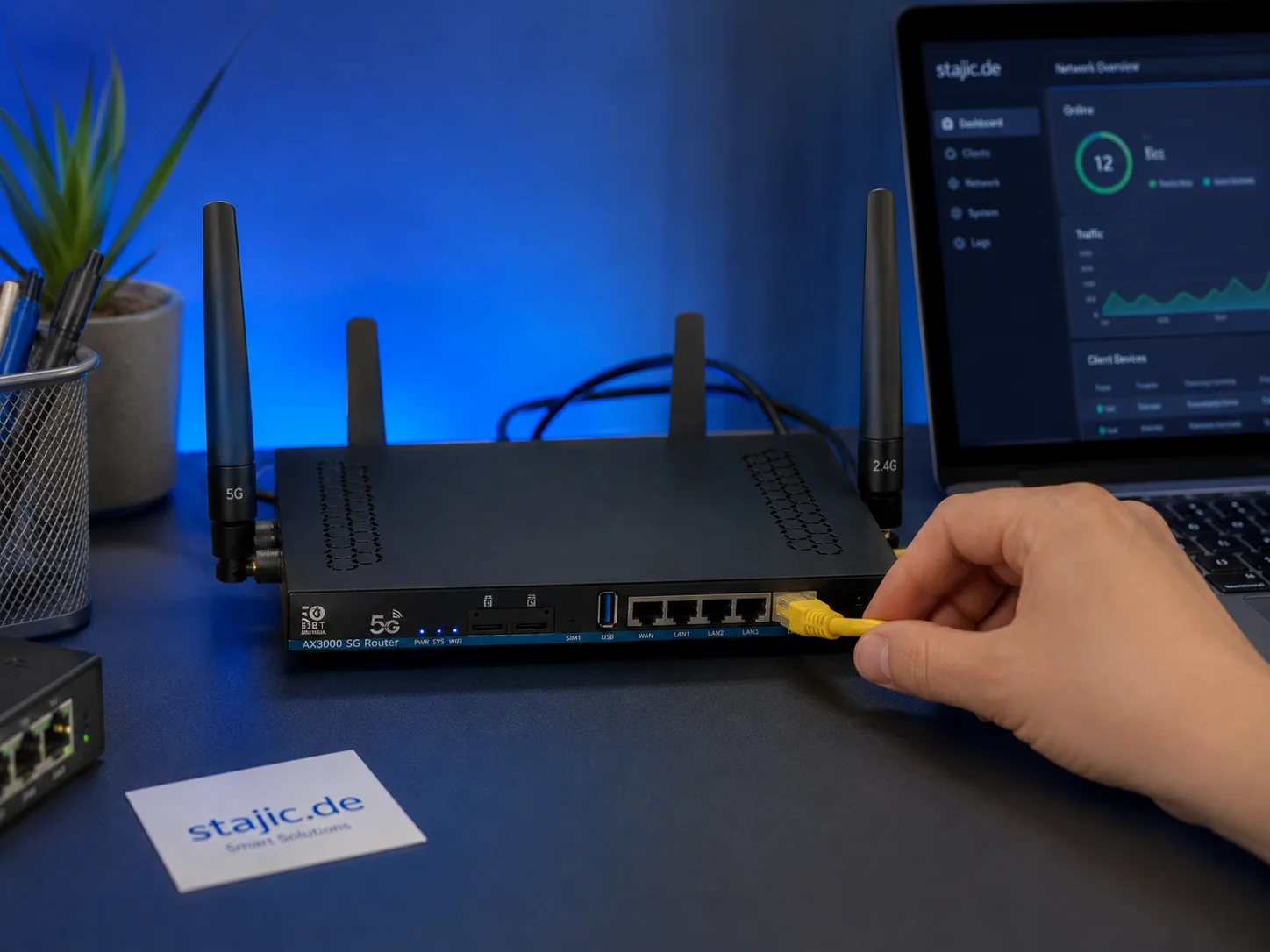
Why a 5G OpenWrt Router Can Be a Smart Upgrade for Gaming, Streaming and Mobile Work
A good internet connection is no longer only about raw download speed. For gaming, streaming, remote work, mobile setups and creative workflows, stability, latency, backup options and network control matter just as much. This is exactly where a 5G OpenWrt router becomes interesting.
One practical example is the ZBT Z8102AX, a 5G OpenWrt-based router with a Quectel RM500U-EA modem, external antennas and dual-SIM hardware. It is not a normal consumer hotspot. It is closer to a flexible network platform for advanced users who want more control over their connection.
Detailed Test Series on stajic.de
The detailed technical test series is published on stajic.de. The main router review is available at https://stajic.de/blog/zbt-z8102ax-5g-openwrt-router-review. The hardware and packaging review is available at https://stajic.de/blog/zbt-z8102ax-hardware-packaging-review. The OpenWrt firmware article is available at https://stajic.de/blog/zbt-z8102ax-openwrt-2102-firmware-review.
https://stajic.de/blog/zbt-z8102ax-5g-openwrt-router-reviewAdditional deep dives cover the RM500U-EA modem at https://stajic.de/blog/zbt-z8102ax-rm500u-ea-5g-modem-test, dual-SIM and failover at https://stajic.de/blog/zbt-z8102ax-dual-sim-failover-test, the buying decision at https://stajic.de/blog/should-you-buy-5g-openwrt-router-old-firmware and the next Wi-Fi 7 router step at https://stajic.de/blog/wifi7-openwrt-5g-router-next-step.
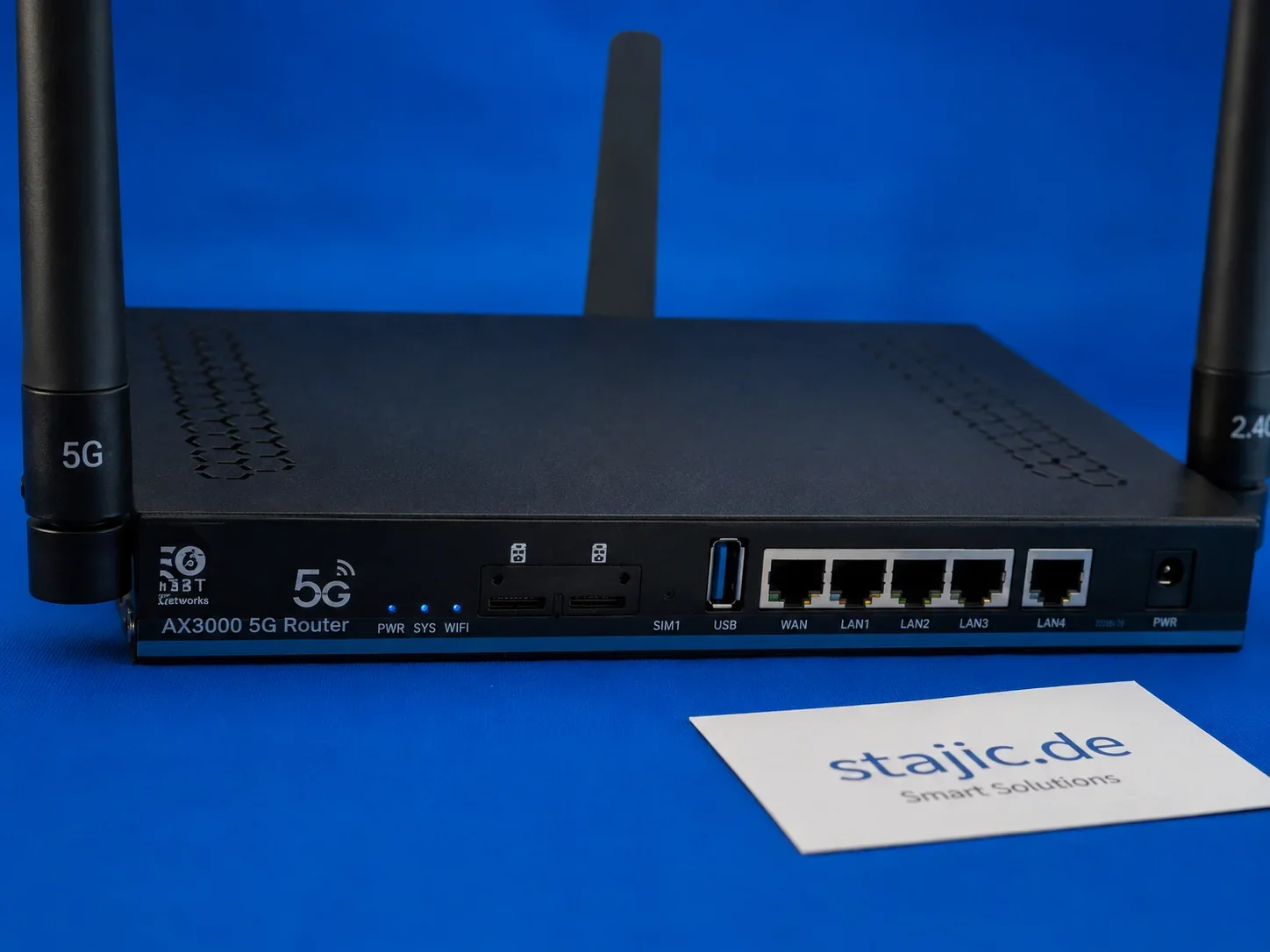
Why This Matters for Gaming
For gaming, the best connection is not always the one with the highest marketing number. Low latency, stable routing, clean Wi-Fi behavior and a reliable backup connection can matter more than one impressive speed test. A 5G OpenWrt router can be useful when fixed-line internet is weak, unavailable or unstable.
The advantage of an OpenWrt-based router is control. Instead of being locked into a simplified consumer interface, advanced users can work with routing, firewall rules, VPN options, traffic handling and monitoring. This makes the router more interesting for people who care about how their network behaves.
- Useful as backup internet for gaming setups
- Interesting for locations with weak fixed-line internet
- More control than many closed consumer routers
- External antennas allow better placement and optimization
- OpenWrt can provide advanced routing and monitoring options
Streaming and Content Creation
Streaming and content creation need stable upload performance. A 5G router with external antennas can be valuable when creators work from changing locations, temporary studios, events or places where fixed internet is not reliable.
The ZBT Z8102AX test shows why this class of device is interesting. It is not only a mobile internet receiver. It is a small network platform that can become part of a more flexible creator setup, especially when combined with good antenna placement and careful firmware configuration.
Mobile Work and Backup Internet
For mobile work, a 5G OpenWrt router can be more practical than using a phone hotspot all day. It can sit near a window, use external antennas, connect multiple devices through Ethernet or Wi-Fi and stay powered without depending on a phone battery.
The lack of an internal battery can even be an advantage in semi-stationary use. Built-in batteries often age, swell or become a weak point. A dedicated router with external power can be better for longer sessions, office backup or controlled network setups.
OpenWrt Turns the Router into a Platform
OpenWrt is the reason this type of router is so interesting. A normal closed router hides most options from the user. OpenWrt gives advanced users the possibility to configure routing, VPN, firewall rules, monitoring, multi-WAN logic and additional packages.
This does not mean that every OpenWrt router is automatically perfect. Firmware quality, hardware support and modem integration still matter. But when the platform works well, OpenWrt can turn a router into a much more useful tool.
Dual-SIM Potential
Dual-SIM hardware is another reason why routers like the ZBT Z8102AX are interesting. In theory, two SIM cards can provide operator redundancy or backup connectivity. For gaming, streaming and work, that can be valuable when one mobile network is weak or temporarily unavailable.
The important detail is honesty: dual-SIM usually means failover or manual operator selection, not automatically combined speed from two SIM cards. This is why the detailed dual-SIM and failover test on stajic.de is important before making final claims.
A Positive First Impression
The first impression of the ZBT Z8102AX is positive. The router worked successfully in the first test period, the modem was detected, the SIM was recognized and the mobile connection came online. It feels like a useful piece of hardware with real potential, especially for advanced users.
It is not perfect, and that is fine. The point is not to pretend that every detail is finished. The point is that this type of device opens interesting possibilities: mobile 5G internet, OpenWrt control, external antennas, dual-SIM potential and a more serious setup than a normal phone hotspot.
Who Should Look at This Router Class?
- Gamers who need backup internet
- Streamers and creators working from flexible locations
- Mobile office users
- Homelab users
- Advanced OpenWrt users
- People with weak or unreliable fixed-line internet
- Users who want more control than a phone hotspot or locked router can provide
The Next Step: Wi-Fi 7 and Stronger Hardware
The ZBT Z8102AX is a good first sample, but the next generation should go further. Wi-Fi 7, a stronger four-core CPU, better firmware clarity, improved packaging and a more stable pricing policy would make this router class even more attractive.
For figure.rocks, this is an exciting direction because gaming and creative technology are not only about GPUs and displays. The network is part of the experience. A flexible 5G OpenWrt router can become a useful part of a modern setup.
Conclusion
A 5G OpenWrt router like the ZBT Z8102AX is not just another internet box. It can become a flexible network tool for gaming, streaming, mobile work and backup connectivity. The positive first test shows that this class of hardware deserves attention.
The detailed technical evaluation continues on stajic.de, where the router is tested from the hardware, firmware, modem, dual-SIM and buying-decision perspective. For users who want more control over their internet connection, this is exactly the kind of device class worth watching.
Related Articles
Network Test Under Load: The Only Result That Predicts Gaming Feel
A speed test is not enough. Gaming feel depends on latency under load. Use this simple test method to reveal spikes, jitter, and bufferbloat.
Router Placement for Gaming: Distance and Obstacles That Create Spikes
Before you buy a new router, fix the environment. Placement, obstacles, and interference create spikes that feel like lag and stutter.
Ethernet vs Wi-Fi for Gaming: The Honest Stability Tradeoff
Speed is not the main issue. Stability is. Ethernet usually wins because it reduces spikes. Use this guide to decide when Wi-Fi is enough and when it isn’t.
WiFi for Gaming: Make It Stable Before You Spend Money
WiFi can feel great or randomly terrible. Learn why interference creates spikes, what to change first, and when Ethernet is the only real fix.
Router Checklist for Gaming: The Settings That Actually Matter
Most router tweaks don’t help. These settings do: queue management under load, stable Wi-Fi behavior, and avoiding features that add latency or instability.
Wi-Fi Congestion: Why It’s Worse at Night (And How to Test It)
If your Wi-Fi feels fine in the afternoon and terrible at night, that’s congestion. Use this test method to prove it and fix what you can control.
Fix Packet Loss: The Hidden Cause of ‘Random’ Online Problems
Packet loss feels like random lag, delayed hits, and stuttering movement. This playbook isolates where loss happens and what to fix first.
Network Testing That Matters: How to Measure Spikes the Right Way
Average ping lies. Measure stability under load to catch jitter and bufferbloat. This quick method shows what actually affects feel.
Wi-Fi Bands Decision: 2.4 vs 5 vs 6E (Gaming Stability First)
Pick Wi-Fi bands by stability, not hype. Use this decision guide to choose 2.4, 5, or 6E based on distance, congestion, and real jitter behavior.
Latency Chain: Where Delay Actually Comes From (End-to-End)
Input lag is a chain: device, game, frame pacing, display, and network. Map the chain and you stop wasting time on placebo tweaks.
Bufferbloat Fix: Router Queues and Why Upload Ruins Your Game
If your game lags when someone uploads or streams, that is usually bufferbloat. Learn what it is and the practical fix order without chasing raw speed.
Router QoS vs SQM: Which Actually Fixes Lag Spikes Under Load?
Many QoS features are marketing. SQM (queue management) targets latency under load — the real cause of bufferbloat spikes. Here’s the practical difference.